
If you're having trouble opening, viewing or reading a letter or document in your Patients Know Best (PKB) record, try the steps below.
Try opening the document another way
If you're using the NHS App, try opening the document directly through PKB at my.patientsknowbest.com. Once logged in, go to Events & Messages to find your documents.
If PKB is available through the NHS App in your area, you can also try viewing the document there by going to:
Messages → Hospital and specialist
You can also try using a different browser or device.
Download the document
When viewing your document in PKB, you will see a download icon next to the document name, as shown below:
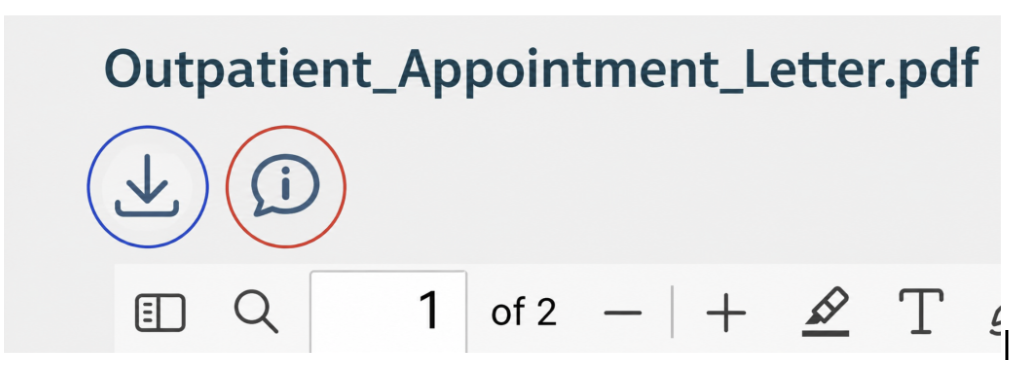
Select the download icon (↓) in your own PKB record to download a copy of the document to your device. The icon is circled in blue in the example screenshot above to help you identify it. Please note that the screenshot itself is not clickable.
If the document isn't displaying correctly in the viewer, we recommend trying to download it first.
Is the writing too small?
If the document opens but the writing is difficult to read, use the + (plus) button on the document toolbar to zoom in.
You can select the + button multiple times to increase the size of the document until it is easier to read.
What happens when I report a document?
To report a problem with your document, select the information (i) icon circled in red as shown on the example screenshot above and follow the on-screen instructions.
If you report the problem before the document's planned print date, a printed copy can be generated and sent to your registered address.
If the planned print date has already passed, you'll be directed to contact the healthcare organisation that sent the document.
Still can't open the document?
If you're still having problems:
- Clear your browser cache, then close and reopen your browser and try downloading the document again.
- Try a different browser or device. If you're using a phone or tablet, you may find it easier to open the document on a PC or laptop.
- Check that your PDF viewer is up to date.
If you've tried the steps above and are still unable to open, view or download your document, please contact PKB Support and we'll be happy to help.
If the information within the document is incorrect, please contact the healthcare organisation that sent the document, as they will need to correct the information on their system.